By Diogenes Monegro · · 7 min read
Python for AI: The Tools Worth Learning and How to Build Your First Agent
Python is the language of artificial intelligence. Here are the five tools people use most, what an AI agent really is, and how to build a simple one in under 60 lines.
If you want to get more out of artificial intelligence than chatting with ChatGPT, sooner or later you'll end up in Python. In 2024, according to GitHub's Octoverse report, Python overtook JavaScript as the most popular language on GitHub, and the same report credits much of that rise to AI and data science.
This guide is for anyone who knows a little programming, or is curious, and wants to understand two things: which Python tools are worth it for AI work, and how an AI agent works under the hood. At the end you'll find a complete, short, commented example.
Why Python dominates AI
Python isn't the fastest language, but it wins for three practical reasons:
- It reads almost like English. A data analyst or an engineer can follow a script without being a career programmer.
- There's a library for everything. Cleaning a spreadsheet, training a model, reading a PDF or calling an AI API takes a few lines.
- AI providers back it. OpenAI, Anthropic and Google publish official Python SDKs, with documentation and examples ready to copy.
GitHub's report also found that use of Jupyter Notebooks, the go-to tool for experimenting with data, grew 92% in a year.
The five Python tools that pay off with AI

- pandas: your data in order. AI is only as good as the data you give it. With pandas you read a spreadsheet or CSV, remove duplicates, join tables and prepare exactly what the model needs to see.
- Jupyter: a notebook for experiments. You write a cell, run it and see the result right away. It's ideal for testing a prompt against ten real examples before turning it into a program.
- The model SDK: your connection to the AI. Packages like
anthropicoropenaiinstall withpip installand let you send a message to the model and get the answer back in three or four lines of code. - Pydantic: answers with a shape. When you ask the AI to pull data from an invoice, you need the amount to be a number and the date to be a date. Pydantic validates that structure and tells you when something is off.
- FastAPI: your agent as a service. Once the agent works on your laptop, FastAPI turns it into an API your website, CRM or automation tool can call.
What about LangChain, LlamaIndex and the other agent frameworks? They can save work on big projects, but you don't need them. Anthropic itself recommends starting by calling the API directly, since many patterns take only a few lines, and warns that frameworks add layers that make it harder to see what's happening and to debug.
What an AI agent is, minus the hype
A chatbot answers with what it knows. An agent can do things: query your database, look up an order, create a task or send an email. Anthropic defines it as a system where the model directs its own process and decides which tools to use to complete the task.
Under the hood, an agent is a simple loop:
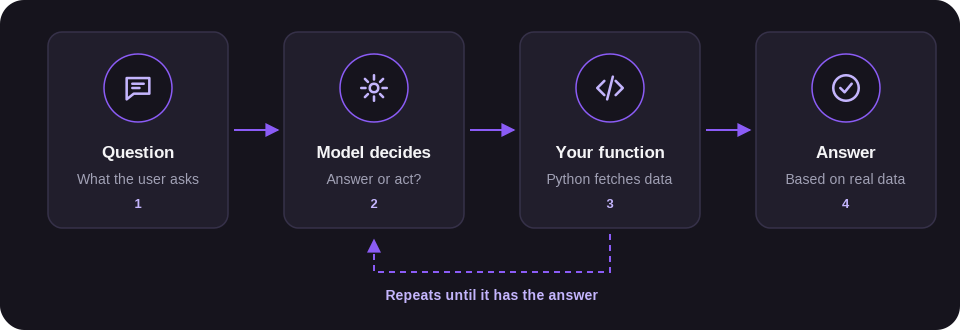
- You describe your tools to the model: a name, what it's for and what data it needs.
- The model decides. If it can answer, it answers. If it needs data, it sends back a request to use a tool, with the inputs already filled in.
- Your code runs the tool and sends the result back to the model.
- Repeat until the model has what it needs and gives the final answer.
That's the trick: the model never touches your systems directly. It only asks, and your code decides what runs. That gives you control and safety.
Example: an agent that looks up orders
Let's build an agent that answers questions about customer orders. We'll use Anthropic's SDK, but the idea is the same with other providers. You need Python installed and an API key stored in the ANTHROPIC_API_KEY environment variable.
pip install anthropicHere's the complete agent:
import json
import anthropic

client = anthropic.Anthropic()  # reads ANTHROPIC_API_KEY from the environment

# 1. Your data. In real life: your database, a spreadsheet or your sales system.
ORDERS = {
    "1042": {"customer": "Luna Hardware", "status": "shipped", "total": 350.0, "paid": 200.0},
    "1043": {"customer": "Central Cafe", "status": "pending", "total": 120.0, "paid": 0.0},
}

# 2. The function the agent can use.
def get_order(number: str) -> str:
    order = ORDERS.get(number)
    if order is None:
        return f"Order {number} does not exist."
    return json.dumps(order)

# 3. The tool description, so the model knows when to use it.
tools = [{
    "name": "get_order",
    "description": "Returns the customer, status, total and amount paid for an order.",
    "input_schema": {
        "type": "object",
        "properties": {
            "number": {"type": "string", "description": "Order number, for example 1042"},
        },
        "required": ["number"],
    },
}]

# 4. The agent loop.
def agent(question: str) -> str:
    messages = [{"role": "user", "content": question}]
    for _ in range(10):  # cap on turns, for safety
        response = client.messages.create(
            model="claude-opus-5-5",
            max_tokens=4096,
            tools=tools,
            messages=messages,
        )
        # No tool request means it has the final answer.
        if response.stop_reason != "tool_use":
            return "".join(b.text for b in response.content if b.type == "text")

        # Keep what the model asked for and run each tool.
        messages.append({"role": "assistant", "content": response.content})
        results = []
        for block in response.content:
            if block.type == "tool_use":
                results.append({
                    "type": "tool_result",
                    "tool_use_id": block.id,
                    "content": get_order(block.input["number"]),
                })
        messages.append({"role": "user", "content": results})
    return "The agent did not finish within 10 turns."

print(agent("How much does Luna Hardware still owe on order 1042?"))
What happens when you run it:
- The model reads the question, sees it has the
get_ordertool and asks to use it withnumber: "1042". The response comes back withstop_reasonset to"tool_use". - Your code runs
get_order("1042")and sends the data back in atool_resultblock, with the sameidas the request. - The model runs again, now with the data, and answers something like: "Luna Hardware still owes $150 on order 1042: the total is $350 and they've paid $200. The order has already shipped."
Notice the model did the math with real data from your system, not made-up numbers. If you ask about an order that doesn't exist, your function says so and the agent passes that on.
How to grow it without overcomplicating
- Add tools one at a time, for example
find_customerorcreate_task. Each one is another function plus its description; in the loop you pick which function to run based onblock.name. - Write good descriptions. The model decides which tool to use by reading the name and description. A clear description beats a long prompt.
- Start with read-only tools. Looking things up is safe. For actions that change something (sending an email, charging a card, deleting), ask a human to confirm before running them.
- Set limits. The turn cap in the example prevents endless loops and surprise bills. Log every tool the agent uses so you can review it later.
- Protect your keys and your data. The API key goes in environment variables, never in the code. Share only the data the task needs with the model. We cover the risks in AI Agents: What They Are and the Risks of Giving Them Access to Your Accounts.
Where to start this week
- Install Python and Jupyter, and try your AI provider's SDK with a single question.
- Pick a lookup your team repeats every day: order status, inventory or a customer's balance.
- Copy the example, swap the
ORDERSdictionary for a pandas read of your spreadsheet and test it with ten real questions.
A useful agent doesn't have to be big. It needs a clear task, good data and well-placed limits.
Sources
- Octoverse: AI leads Python to top language as the number of global developers surges(opens in a new tab) — GitHub, 2024
- Building effective agents(opens in a new tab) — Anthropic, 2024
- Tool use with Claude(opens in a new tab) — Anthropic (Claude Docs), 2026
About the author
Diogenes MonegroCEO, ShineTechData
Diogenes Monegro is the CEO of ShineTechData, a data and AI consultancy based in San Pedro de Macorís, Dominican Republic, that helps small and mid-sized businesses put their data to work.