By Diogenes Monegro · · 8 min read
Data Governance for Small Business: A Practical Guide with a Distributor Example
What data governance means in plain language and how to apply it in a small business in 6 steps, using a distributor as the example: data owners, definitions, access, quality and backups.
The same thing happens in a lot of small businesses: sales says the month closed at one number, accounting says another, and the owner doesn't know which one to believe. The same customer shows up three times under different names, the sales rep's price list doesn't match the system's, and nobody remembers who has the password to the company email.
A new piece of software won't fix that. Clear rules about your data will, and that's what data governance is. In this article we explain it in plain language and apply it step by step to a very common business: a distributor.
What data governance is
Data governance is the set of rules that answers four questions about your business's information:
- Who owns each piece of data and answers for it.
- What each number means: what counts as a "sale", an "active customer" or "margin".
- Who can see and who can change each piece of data.
- How it's kept clean, secure and backed up.
Large companies have committees and whole departments for this. In a small business, a one-page set of rules, one responsible person and a monthly review are enough.
It's not the same as AI governance, which defines which AI tools your team uses and with what data. If that's your concern, see our guide to AI governance to protect your data. Data governance comes first: if your data is messy, any dashboard or AI tool you put on top of it inherits the mess.
Why it matters even if you're small
Trouble trusting data isn't just a small-business problem. In the 2025 Outlook study by Precisely and Drexel University's LeBow College of Business, covering more than 550 data and analytics professionals, 67% of organizations said they don't completely trust the data they use for decision-making. 45% named inconsistent data definitions and formats as a barrier to high-quality data, and 51% cited data governance as a challenge, up from 27% the year before.
The other side is security. According to Verizon's 2025 Data Breach Investigations Report, which analyzed more than 22,000 incidents, ransomware was present in 44% of breaches and third-party involvement, such as suppliers and partners, doubled to 30%. Verizon highlights ransomware's disproportionate impact on small and medium-sized businesses, and an IDC analyst quoted in the release estimates that in organizations with less security maturity, often SMBs, ransomware is present in 88% of breaches. The median ransom payment was $115,000, an amount Verizon itself calls significant for many SMBs.
Both problems are tackled with the same rules: knowing what data you have, where it lives, who answers for it and who has access.
The distributor in our example
Picture a cleaning-supplies distributor with 25 employees and about 1,200 customers, from corner stores to supermarkets and offices. Its data lives in several places:
- The invoicing system, with customers, invoices and payments.
- An Excel price list that each sales rep keeps on their laptop.
- Orders that come in over WhatsApp to the reps' phones.
- A shared cloud folder with contracts, account statements and reports.
- Inventory, which the warehouse tracks in a separate sheet.
The symptoms were the usual ones:
- The same customer was registered up to three times, with different names and tax ID numbers.
- A rep quoted from a six-month-old price list and the company lost margin on a large order.
- To sales, a "sale" was an order taken; to accounting, an invoice issued. Every meeting started with an argument about which number was right.
- A rep who had quit two months earlier could still open the shared folder.
- Nobody knew when the invoicing system had last been backed up.
Data governance in 6 steps, applied
1. Take an inventory of your data
Before setting rules, look at what you have. A sheet with five columns is enough: what the data is, where it lives, who uses it, whether it holds personal information about customers or employees, and how bad it would be to lose it.
At the distributor: the inventory fit on one page with 12 rows. That alone surfaced the first problem: the price list existed in 9 versions, one per rep.
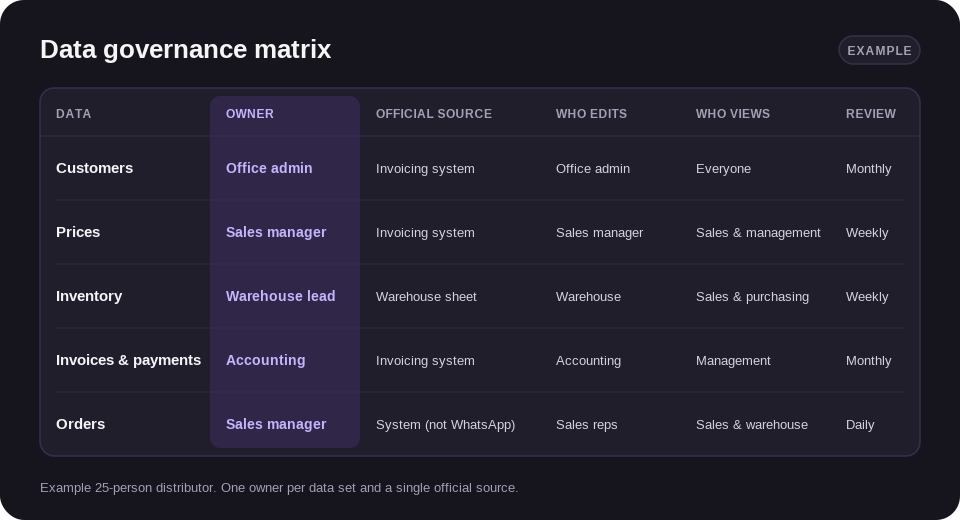
2. Give every piece of data an owner
Every important piece of data needs a person who answers for it. Not whoever uses it, but whoever decides how it's recorded and fixes the errors.
At the distributor:
- Customers: the office administrator.
- Prices: the sales manager.
- Inventory: the warehouse lead.
- Invoices and payments: accounting.
3. Write a data dictionary
One page with the words people argue about most and what they mean at your company. It doesn't have to be perfect; it has to be the same for everyone.
The distributor defined four terms:
- Sale: an invoice issued, not an order taken.
- Active customer: bought at least once in the last 90 days.
- Margin: sale price minus purchase cost, excluding shipping.
- Overdue account: an invoice still unpaid 30 days after its due date.
With that, the sales dashboard and the accounting report started showing the same number.
4. One official source per piece of data
Each piece of data has a single place where it's "the truth". Every other copy is fed from there and nobody edits it by hand.
At the distributor: prices are only changed in the invoicing system. Every Monday a PDF price list is exported for the reps, with the date visible in the header. The personal Excel files were deleted.
5. Control who gets into what
The rule is simple: each person sees what they need for their job, with their own account, and nothing more.
At the distributor:
- No more shared accounts; everyone has their own login.
- Two-step verification was turned on for email, the invoicing system and the shared folder.
- Reps can see prices and customers but can't edit them.
- They built an offboarding checklist: when someone leaves, their access is removed that same day and any passwords they knew are changed.
6. Check quality and back up
Rules without reviews get forgotten. Set a few quality rules you can actually check, and a short monthly review.
At the distributor:
- No customer can be created without a tax ID, and the system warns if that ID already exists.
- On the first Monday of each month, the office administrator reviews duplicate customers and incomplete records, in about 30 minutes.
- The invoicing system is backed up every night, with one copy off-site, and once a quarter they test that the backup can actually be restored.
What changed
In this example, after three months:
- 1,240 customer records became 980 after merging duplicates. More than 1 in 5 records was a copy.
- No quote went out with an old price list, because only one exists.
- Monthly meetings stopped opening with "which number is the right one?".
- No former employee has access to company data.
The numbers are illustrative: yours will differ. What repeats is the pattern: almost none of this required buying software, just deciding who is in charge of each piece of data and writing it down.
Common mistakes
- Starting with the tool: a new system running the same messy rules just organizes the mess.
- Trying to govern everything: start with the 4 or 5 data sets you use most to make decisions, usually customers, prices, sales, inventory and receivables.
- Owners with no time: if a data owner doesn't have 30 minutes a month to review it, in practice it has no owner.
- Rules nobody knows: the one-page rules have to live where people work, not in a forgotten folder.
- Forgetting offboarding: access held by former employees and suppliers is one of the most common doors in, and one of the easiest to close.
Your next step
This week, take the inventory: one sheet with your data, where it lives and who uses it. Next week, give each one an owner and write your four or five definitions. That's the foundation of your data governance.
Once your data is in order, getting value from it with dashboards is much easier. Start with our practical guide to business intelligence for small business and see the benefits of having one version of the numbers. And if you'd like help, at ShineTechData we run data audits for small businesses: we map where your data lives and who touches it, and build the rules with you to keep it clean and secure.
Sources
- 2025 Planning Insights: Data Quality Remains the Top Data Integrity Challenge(opens in a new tab) — Precisely (with Drexel LeBow's 2025 Outlook: Data Integrity Trends and Insights), 2024
- Verizon's 2025 Data Breach Investigations Report: Alarming surge in cyberattacks through third-parties(opens in a new tab) — Verizon, 2025
About the author
Diogenes MonegroCEO, ShineTechData
Diogenes Monegro is the CEO of ShineTechData, a data and AI consultancy based in San Pedro de Macorís, Dominican Republic, that helps small and mid-sized businesses put their data to work.