By Diogenes Monegro · · 4 min read
ChatGPT vs Gemini for Business: Which One Should Your Team Pay For?
Both are good enough for everyday work. The real differences for a business are where your work lives, what you already pay for and what happens to your data. Here's how to choose.
ChatGPT and Gemini are both good enough for everyday work: drafting emails, summarizing documents, analyzing a spreadsheet or preparing a presentation. For a business, the choice rarely comes down to which model is smarter this month. It comes down to three practical questions: where your team's work lives, what you already pay for and what happens to your company's data.
This guide compares the business plans, not benchmarks, because models change every few months while those three questions don't. Prices are the ones each company published on its pricing page in November 2026, per user per month.
The short answer
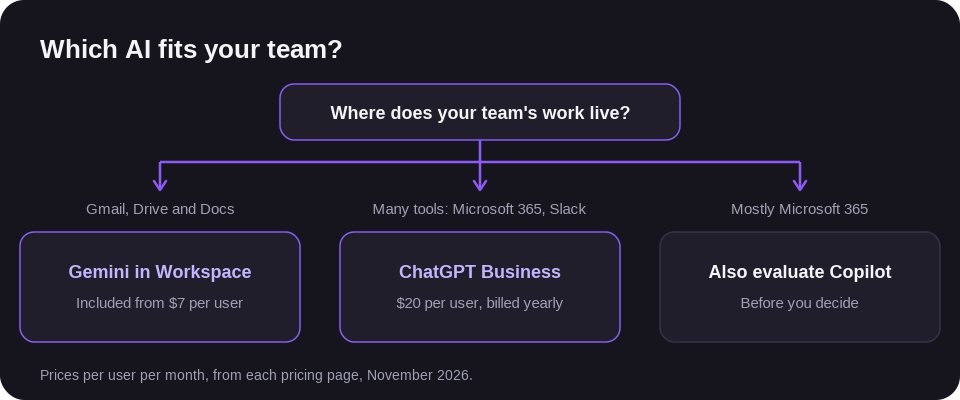
- Your company runs on Gmail, Google Drive and Google Docs: Gemini in Google Workspace is usually the simplest and cheapest path, because it lives inside the tools you already use and comes with the plan.
- Your team works across many tools, like Microsoft 365, Slack and GitHub, or wants one AI workspace for everything: ChatGPT Business.
- Your company runs mostly on Microsoft 365: also evaluate Microsoft Copilot before deciding.
What each one costs
ChatGPT (OpenAI):
- Free, Go, Plus and Pro are personal plans. Plus costs $20 a month.
- ChatGPT Business costs $20 per user per month billed yearly, or $25 billed monthly, for teams of 2 to 200 people. A Premium access level costs $100 per user per month billed yearly for heavier use.
- Business includes single sign-on (SAML SSO), multi-factor authentication, central billing, usage analytics and connections to Google Workspace, Slack, GitHub and Microsoft 365.
Gemini (Google Workspace, with a yearly commitment):
- Business Starter, $7 per user: Gemini in Gmail and the Gemini app, but not in Docs, Sheets, Slides, Meet or Drive.
- Business Standard, $14 per user: Gemini in Gmail, Docs, Sheets, Slides, Meet, Drive and Chat, plus Google's most capable models.
- Business Plus, $22 per user: everything in Standard, plus Vault for retention and eDiscovery and stronger security controls.
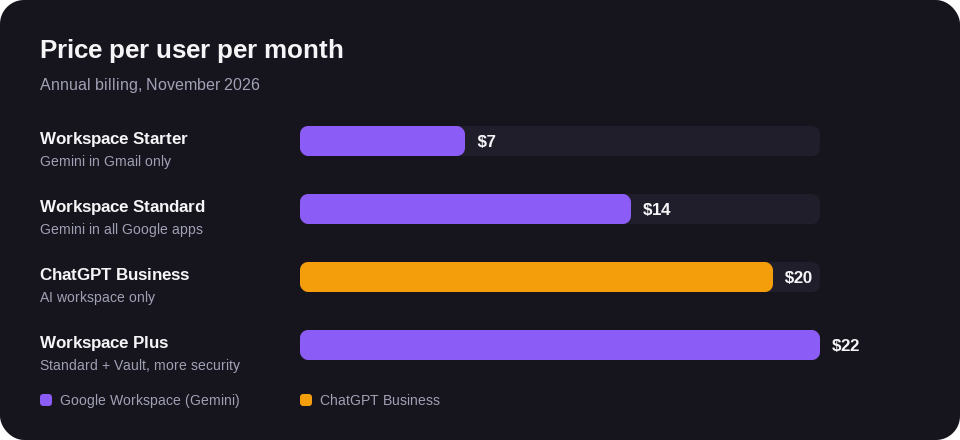
Keep in mind that you're comparing different things. Google Workspace is your email, storage, calendar and video calls with AI included. ChatGPT Business is an AI workspace that connects to the tools you already have. For a team of 10 already on Workspace Business Standard, Gemini costs nothing extra; adding ChatGPT Business would be about $200 a month on annual billing.
Where each one shines
Gemini works inside your Google tools. It summarizes a long thread in Gmail, drafts in Docs, takes notes in Meet, finds files in Drive and helps analyze data in Sheets, without copying and pasting between apps. It's at its best when your work already lives in Google.
ChatGPT is a separate workspace that connects to many tools. It's strong for longer research, analyzing files you upload, shared projects and custom assistants for the team, and coding with Codex. It's at its best when your work is spread across several tools or you want one assistant for everything.
Features change often on both sides, so test them with your own tasks before deciding.
The rule that matters most: company accounts, not personal ones
On OpenAI's personal plans (Free, Go, Plus and Pro), conversations can be used to train its models unless the user turns that off. ChatGPT Business doesn't train on your company's data by default. Google says company data in Workspace is not used to train its models.
The biggest risk usually isn't the tool you choose. It's employees pasting customer or financial data into personal accounts the company doesn't control. Whichever you pick, give the team company accounts and a short policy on what can and can't be shared. We explain how in AI governance for small teams: write a data policy before you deploy AI.
How to decide in two weeks
- Pick three real tasks your team repeats every week, like answering customer emails, summarizing meetings or preparing a monthly report.
- Give three to five people access to both and have them do the same tasks with each. Google Workspace offers a 14-day free trial.
- Measure time saved and quality, not impressions: minutes per task and how much editing the output needed.
- Add up the real cost per user, counting what you already pay for email and storage.
- Pick one, write a short policy and train the team. Paying for two AI tools that do the same job is a common and avoidable expense.
The right AI for your business is the one your team actually uses, on company accounts, for tasks you can measure.
Sources
- ChatGPT plans and pricing(opens in a new tab) — OpenAI, 2026
- Compare Google Workspace pricing plans(opens in a new tab) — Google, 2026
About the author
Diogenes MonegroCEO, ShineTechData
Diogenes Monegro is the CEO of ShineTechData, a data and AI consultancy based in San Pedro de Macorís, Dominican Republic, that helps small and mid-sized businesses put their data to work.