By Diogenes Monegro · · 6 min read
AI Automation for Small Business: n8n vs Zapier and What to Automate First
Zapier and n8n both connect your apps and add AI to everyday work, but they charge in very different ways. Here's how they compare, which one fits your business and the first processes worth automating.
Most small businesses lose hours every week moving data by hand: a lead fills out a form, someone copies it into a spreadsheet, then into the CRM, then writes the follow-up email. Automation tools connect those apps so the work happens on its own, and today both of the popular ones let you add AI steps, like summarizing a message or deciding what kind of request it is.
Two names come up more than any other: Zapier, the no-code tool with one of the largest catalogs of app connections, and n8n, a more technical tool you can also run on your own server. This guide compares them on what matters to a small business: price, ease of use, AI features and control over your data. Prices are the ones each company published on its pricing page in November 2026.
What AI automation actually means
Every automated workflow has a trigger (something happens: a new form, a new invoice, an email arrives) and one or more actions (what happens next: create a record, send a message, update a sheet).
AI steps sit in the middle. They read an email and decide whether it's a sales lead or a support request, pull the amounts out of a PDF invoice, or draft a reply. The AI does the reading; the workflow does the moving.
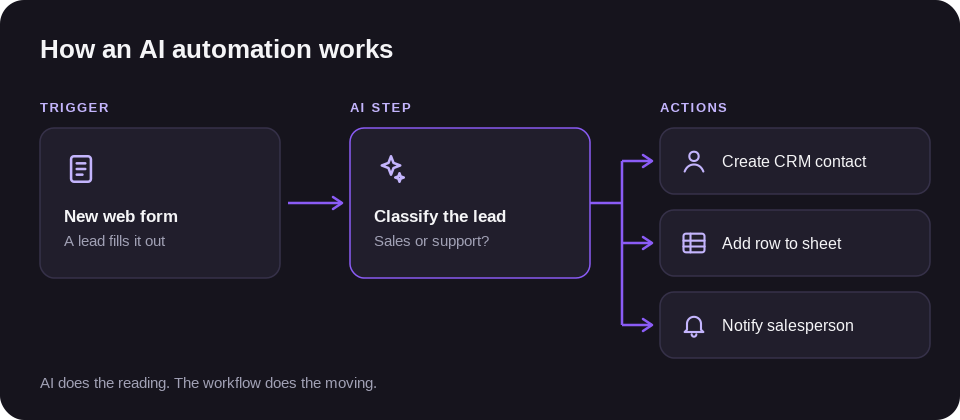
A useful rule: use AI only for judgment calls on text, and plain rules for everything else. Rules are cheaper, faster and always give the same answer.
Zapier: the easiest place to start
- A visual, no-code editor. Zapier says it connects to more than 9,000 apps.
- The free plan includes 100 tasks a month and two-step Zaps: one trigger and one action.
- Professional starts at $19.99 a month, billed yearly, and adds multi-step Zaps, premium apps, webhooks and AI fields. Team starts at $69 a month, with up to 25 users and shared Zaps.
- It charges by tasks: every step in a Zap uses tasks, and AI models or code can use more. All your workflows draw from the same pool.
Best for: teams without technical staff who want something running this week, and processes built on popular cloud apps.
n8n: more control, more setup
- Also a visual editor, but built with developers in mind: you can add JavaScript or Python steps and call any API.
- Cloud plans start at $20 a month, billed annually, for 2,500 workflow executions (Starter), and $50 a month for 10,000 (Pro). Every plan includes unlimited users, workflows and integrations.
- It charges by executions: one complete run of a workflow counts once, no matter how many steps it has.
- The Community Edition is free to self-host, meaning you run it on your own server. The license costs nothing, but you pay for the server and you're responsible for updates, backups and security.
- Cloud plans include an AI Agent node, MCP support and human approval before an agent uses a tool.
Best for: businesses with someone technical (on staff or a partner), workflows with many steps or high volume, and data that has to stay on your own infrastructure.
Price: the number of steps changes everything
Take a lead workflow with five steps: receive the form, have AI classify the lead, create the contact in your CRM, add a row to a sheet and notify the salesperson. It runs 500 times a month.
- In n8n, that's 500 executions, well inside the 2,500 included in Starter.
- In Zapier, each action step uses tasks, so the same workflow uses around 2,000 tasks a month or more, far beyond the 100 on the free plan. You'd need a higher task tier on Professional.
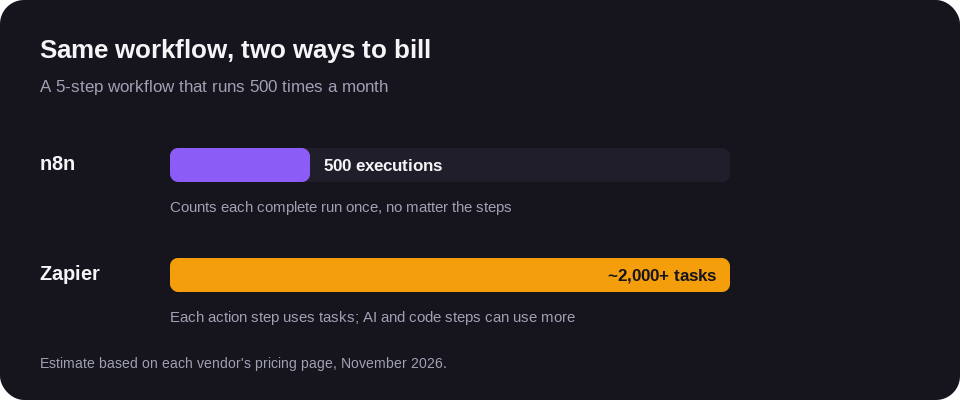
The takeaway: with a few simple workflows the price gap is small, and Zapier saves you setup time. With many steps or high volume, n8n's per-execution pricing usually comes out cheaper. Before deciding, price your real workflow on both pricing pages.
Which one should you choose?
Choose Zapier if:
- Nobody on your team writes code.
- You need it working fast.
- Your apps are mainstream cloud tools (Gmail, Google Sheets, HubSpot, QuickBooks, Slack).
- Your volume is low or moderate.
Choose n8n if:
- Someone can build and maintain it.
- Your workflows have many steps or run thousands of times a month.
- You need custom code or connections to internal systems.
- You want your data on your own servers.
Either way, start with the process, not the tool. Automating a broken process just makes the mistakes happen faster.
What to automate first
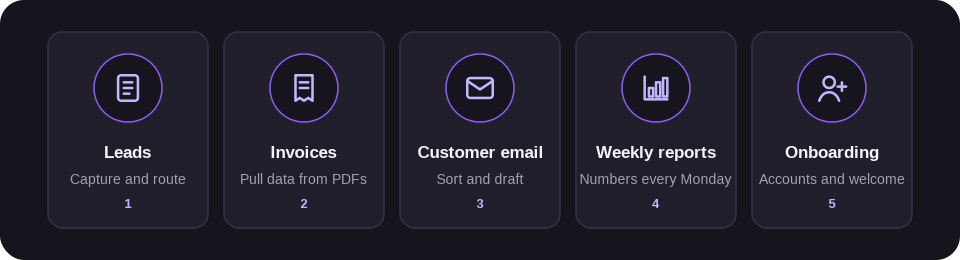
- Lead capture and routing: web form to CRM to a notification for the right salesperson, within minutes. It's easy to measure through response time.
- Invoices and receipts: AI pulls the vendor, date and amount from PDFs into your accounting sheet, and a person approves before anything is posted.
- Customer email triage: AI sorts incoming messages and drafts a reply; a person reviews and sends it.
- Weekly reports: every Monday, pull the numbers from sales and ads into a sheet or dashboard so nobody builds the report by hand.
- Onboarding: a new client or employee automatically gets accounts, folders and a welcome email.
The best first candidates happen often, follow clear rules and fail in ways that are easy to spot.
Guardrails before you switch it on
- Minimum permissions: give each automation only the accounts and access it needs. We explain why in AI agents and the risks of giving them access to your accounts.
- Human approval: nothing goes to a customer or moves money without a person signing off.
- Error alerts: both tools can notify you when a workflow fails. Assign someone to watch them.
- Measure the return: compare the hours saved each week against the total cost, as we show in how to measure generative AI ROI.
Automation pays off when it rests on a clear process and clean data. Pick one workflow, measure how long it takes today, automate it and compare. That number tells you whether to automate the next one.
Sources
- Plans & Pricing(opens in a new tab) — Zapier, 2026
- n8n Plans and Pricing(opens in a new tab) — n8n, 2026
About the author
Diogenes MonegroCEO, ShineTechData
Diogenes Monegro is the CEO of ShineTechData, a data and AI consultancy based in San Pedro de Macorís, Dominican Republic, that helps small and mid-sized businesses put their data to work.